

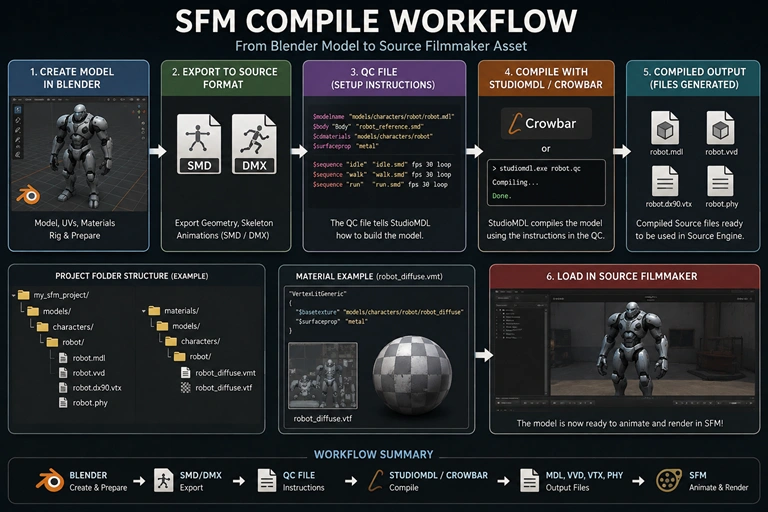

SFM Compile: What Does It Actually Mean?
You have a custom model sitting in Blender. It looks perfect, the textures are assigned, and the rig works. Then you try to use it in Source Filmmaker and nothing happens—or you get a T-pose, missing textures, or a compiler error. The problem is usually not the model itself. SFM compile is the conversion stage that turns Source-compatible intermediate files and instructions into the binary model files that SFM can load. Valve describes a QC file as the script controlling the compilation of SMD data into a binary model.
In simple terms, the workflow is:
3D software → SMD/DMX → QC file → StudioMDL/Crowbar → compiled Source model → Source Filmmaker
That distinction is crucial. An FBX, OBJ, Blender file, or other source asset is not automatically an SFM-ready model.
Quick Summary
- SFM compile prepares custom assets for the Source engine used by Source Filmmaker.
- A QC file tells StudioMDL how to assemble the model.
- SMD and DMX are commonly used as intermediate Source model formats.
- StudioMDL is Valve’s model compiler; Crowbar provides a convenient graphical interface around Source compiling workflows.
- Model materials use Source’s material system, typically involving VMT material files and VTF textures.
- Characters require additional work for skeletons, weights and animation sequences.
- Many apparent “compile errors” are actually path, material, export or configuration problems.
How Does SFM Compile Work?
A Source model is not simply a mesh with textures attached. The compiler needs instructions describing where the model belongs, which geometry it should use, what materials it references and, when applicable, which animations or physics data should be included.
That is the job of the QC file.
Valve’s documentation describes QC as a script that controls model compilation, including the model’s location and name, geometry, collision meshes and animations.
A simplified pipeline looks like this:
- Create or prepare the model in Blender, Maya or another compatible application.
- Export the required geometry, skeleton or animation data.
- Prepare Source materials and textures.
- Write the QC script.
- Run StudioMDL or a graphical frontend such as Crowbar.
- Check the compiler output for errors and warnings.
- Place or generate the compiled files in the appropriate SFM game directory.
- Load and test the asset in Source Filmmaker.
The compiler then produces the binary model data used by the Source engine. StudioMDL is specifically documented by Valve as the command-line tool that compiles model data into the binary .mdl format.
What Are MDL, VVD, VTX and PHY Files?
A compiled Source model is normally represented by several related files rather than a single universal “model file.”
The .MDL is the primary model file. Other generated files can contain vertex and rendering information, while a .PHY file can provide physics data when a physics model is compiled.
The exact collection depends on the model and compiler branch, so don’t assume every asset will always generate every possible extension.
The key point is simple: keep the generated files together and preserve the directory structure expected by the model.
What Tools Do You Need for an SFM Model Compile?
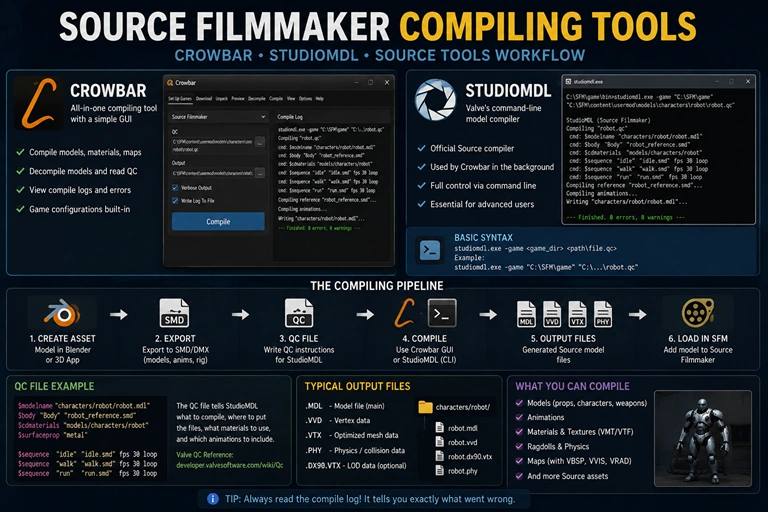
You don’t need a professional game-development studio to build a basic SFM compile pipeline. A small collection of tools is enough.
Source Filmmaker
SFM is the final destination for the compiled asset. Its installation also contains Source-related tools, including the relevant studiomdl.exe executable in the installation’s bin directory.
Blender
Blender is commonly used to create, edit, rig and prepare models. With appropriate Source export tooling, creators can export Source-compatible intermediate files.
Blender Source Tools
The Blender Source Tools project provides SMD and DMX export functionality for Blender-based Source workflows. Community documentation commonly uses this route when moving models from Blender toward Source compilation.
StudioMDL
StudioMDL is the actual Valve model compiler. It accepts a QC file and processes the referenced model data. Valve documents the basic syntax as:
studiomdl [options] <path\QC>
The -game parameter can be used to specify the game directory when necessary.
Crowbar
Crowbar is popular because it provides a graphical workflow for Source model compilation and decompilation. It is especially useful when you’re learning because the compile log is easier to inspect than repeatedly working from a command prompt.
The important distinction is that Crowbar is not the model format. It is a tool that can make Source compilation workflows easier to manage.
Texture Tools
Source materials generally involve VTF textures and VMT material definitions. Your image-editing application can create the source texture, but it must eventually be converted/prepared for Source’s material system.
How to Compile a Model for Source Filmmaker
This is the practical part. If you’re new to SFM compile, start with a simple prop instead of a fully rigged character.
A static prop lets you troubleshoot the basic pipeline before adding skeletons, weights, animations and physics.
Step 1: Prepare the Model
Before exporting, inspect the model itself.
Check:
- Scale
- Rotation
- Origin/pivot
- Normals
- UVs
- Material assignments
- Mesh naming
- Unused geometry
- Object transforms
Apply transforms where appropriate in your 3D application and make sure the model’s scale is intentional.
For a character, also verify the skeleton and vertex weights. A compiler cannot repair fundamentally broken rigging.
Step 2: Export SMD or DMX Data
Export the model using a Source-compatible workflow.
Depending on the asset, you may need separate files for:
- Reference geometry
- Skeleton
- Animation sequences
- Physics/collision geometry
- Additional bodygroups
SMD and DMX serve as intermediate formats in Source model workflows. The QC file then tells StudioMDL what to do with those files.
Keep your filenames predictable. Something like:
my_prop_reference.smd
my_prop.qc
idle.smd
my_prop_diffuse.png
is much easier to troubleshoot than a collection of automatically generated filenames.
Step 3: Create the VMT and VTF Materials
Source’s material system is separate from the original image texture.
A basic VMT can look like:
"VertexLitGeneric"
{
    "$basetexture" "models/custom/my_prop_diffuse"
}
Notice that $basetexture points to the Source material path without the .vtf extension.
A typical arrangement is:
game/
└── usermod/
    ├── models/
    │   └── custom/
    │       └── my_prop.mdl
    │
    └── materials/
        └── models/
            └── custom/
                ├── my_prop_diffuse.vtf
                └── my_prop_diffuse.vmt
The exact folder arrangement can vary with your project, but the relationship between $cdmaterials, VMTs and texture paths must remain consistent.
If your model compiles but appears purple and black, investigate the material paths before rebuilding the geometry.
Step 4: Write the QC File
The QC file is the central instruction script.
A simple prop can follow this general structure:
$modelname "custom/my_prop.mdl"

$body "Body" "my_prop_reference.smd"

$cdmaterials "models/custom"

$surfaceprop "metal"

$sequence "idle" "my_prop_reference.smd" fps 30
Each command has a specific role.
| QC Command | What It Controls |
|---|---|
$modelname |
Output model path and filename |
$body |
Main model geometry |
$cdmaterials |
Material search path |
$surfaceprop |
Surface/physical material property |
$sequence |
Animation sequence |
$collisionmodel |
Optional physics/collision model |
Valve’s QC documentation provides a similar basic example using $modelname, $body, $surfaceprop, $cdmaterials and $sequence.
Don’t blindly copy QC commands from a different model type. A prop, character, ragdoll and animated creature can require very different QC structures.
Step 5: Compile With Crowbar
For beginners, Crowbar is usually the easier route.
Open the Compile section, select the appropriate Source Filmmaker game configuration, choose your QC file and start the compile.
Then read the log.
That last part matters.
A message such as “compile failed” only tells you the final result. The useful information is normally earlier in the log, where StudioMDL identifies the missing file, invalid command, malformed model data or other problem.
Step 6: Test the Compiled Model
Once compilation succeeds, open Source Filmmaker and search for the model in the asset browser.
If it doesn’t appear:
- Verify the compiled model exists.
- Check the
$modelnamepath. - Confirm the files are inside an active SFM game directory.
- Check the model browser’s filters.
- Restart or refresh SFM if necessary.
- Inspect the compile log again.
A successful compile does not automatically guarantee that SFM will display the model correctly.
What Is an SFM QC File and Why Does It Matter?
If you remember only one technical concept from this guide, remember this:
The QC file is the build instruction sheet for your Source model.
It tells StudioMDL how to turn intermediate model data into an engine-ready asset. Valve’s documentation explicitly describes QC as the script controlling the compilation process.
For example:
$modelname "characters/robot/robot.mdl"

$body "Body" "robot_reference.smd"

$cdmaterials "models/characters/robot"

$sequence "idle" "idle.smd" fps 30 loop
This doesn’t mean every character can use this exact structure. It demonstrates the relationship between the output path, model data, materials and animation.
Once you understand QC, SFM compilation stops feeling like a mysterious black box. You can look at a compiler error and ask a much more useful question:
Which instruction failed, and what file or asset was that instruction trying to access?
That mindset makes troubleshooting much faster.
How Do You Compile SFM Characters and Animations?
Characters are more demanding than props because the model has to work with a skeleton.
The pipeline becomes something like:
Mesh → skeleton → weights → reference export → animation exports → QC → StudioMDL → SFM
A character may use separate SMD or DMX files for different animations.
For example:
$sequence "idle" "idle.smd" fps 30 loop
$sequence "walk" "walk.smd" fps 30 loop
$sequence "run" "run.smd" fps 30 loop
The exact sequence setup depends on the model.
Why Do Characters Become Complicated?
A character can fail in several independent ways.
The mesh may be correct while the skeleton is wrong. The skeleton may be correct while the weights are broken. The reference model may compile while an animation sequence fails.
That is why an efficient workflow is incremental:
Compile the reference model first → test it → add idle → test it → add other animations → test again.
Don’t throw 20 animations into the first compile and then try to determine which one broke the build.
Source workflows also have technical limits. Community documentation, for example, identifies limits around bones, material counts, vertex indexing and per-vertex weights, so extremely complex assets may require optimization before compilation.
Why Is My SFM Model Not Working? Common Compile Errors
The fastest way to solve SFM problems is to classify the failure.
| Problem | Likely Cause | First Thing to Check |
|---|---|---|
| Model doesn’t appear | Wrong output path or game directory | $modelname and SFM search path |
| Purple/black texture | Missing VMT/VTF or wrong path | $cdmaterials and $basetexture |
| T-pose | Animation/skeleton problem | Reference skeleton and $sequence |
| Compiler says file missing | Incorrect filename/path | QC references |
| Model is huge/tiny | Scale mismatch | Export transforms and units |
| Broken deformation | Bad weights/bones | Rig and vertex weights |
| Physics doesn’t work | Collision setup | $collisionmodel |
| Compile stops unexpectedly | QC or source-data error | First meaningful compiler error |
Missing File Errors
These are often the easiest to solve.
If the QC references:
$body "Body" "hero_reference.smd"
but the actual file is:
hero_ref.smd
the compiler cannot guess what you meant.
Fix the filename or fix the QC.
Purple-and-Black Textures
A purple checkerboard generally means Source cannot correctly resolve the material/texture.
Check:
- Does the VMT exist?
- Does the VTF exist?
- Is
$basetexturecorrect? - Does
$cdmaterialspoint to the correct directory? - Are you placing files under the correct game/materials structure?
Do not re-export the entire model until you have ruled out the material pipeline.
T-Pose Problems
If a character compiles but remains in a T-pose, inspect the skeleton and animation setup.
Check the reference SMD/DMX, sequence references and bone hierarchy.
If the reference model itself is malformed, adding more animations will not solve the problem.
Scale Problems
If the model is microscopic or enormous in SFM, check the source application’s unit settings and transforms before changing the QC.
Fixing scale at the source is generally cleaner than repeatedly compensating later.
SFM Compile Best Practices That Save Hours
The most useful SFM compiling habit isn’t a particular tool. It’s controlled troubleshooting.
Keep a clean project folder:
my_model/
├── source/
├── export/
├── materials/
├── qc/
└── compiled/
You can adapt this organization to your own workflow, but separate your source assets from generated files.
Also keep a known-good QC template. When a new model fails, compare its script against the working template rather than starting from scratch.
Compile Small Before Compiling Big
A simple cube or prop can answer several questions immediately:
- Is StudioMDL configured?
- Is Crowbar pointing to the right game?
- Is the output directory correct?
- Can SFM see the generated model?
- Are materials loading?
Once that works, move to a character.
Read the First Important Error
Suppose the compiler produces ten lines of warnings after one missing-file error.
Don’t start fixing all ten warnings.
Fix the first meaningful failure, compile again and see what remains.
This is one of the most reliable ways to debug Source tools because later errors can be consequences of the first failure.
Keep Backups of Working Builds
When a character finally compiles correctly, keep that version.
Then make changes incrementally.
If a new bodygroup or animation breaks the model, you can return to the working build instead of reconstructing the entire asset.
Can You Compile Custom Maps for SFM?
Yes, but map compilation is a different workflow from model compilation.
For custom Source maps, the starting point is generally a Hammer map project, and the map compilation pipeline uses tools such as:
- VBSP — builds the BSP structure.
- VVIS — calculates visibility.
- VRAD — calculates lighting.
This should not be confused with StudioMDL. StudioMDL compiles models; the map compiler tools compile maps.
That distinction becomes useful when troubleshooting.
If your custom character loads perfectly in an empty SFM scene but disappears or behaves strangely inside a custom environment, the problem may belong to the map rather than the model.
Frequently Asked Questions About SFM Compile
What is SFM compile?
SFM compile is the process of converting Source-compatible model data and a QC instruction file into compiled Source model files that Source Filmmaker can load. StudioMDL is Valve’s model compiler for this workflow.
Do I need Crowbar to compile an SFM model?
No. Crowbar is a convenient graphical frontend for Source model workflows, but Valve’s StudioMDL compiler can also be run directly. The StudioMDL executable accepts a QC file and compilation options.
Why is my SFM model purple and black?
The model may have compiled correctly while its Source material cannot find the required texture. Check the VMT, VTF, $basetexture and $cdmaterials paths before recompiling the geometry.
Can I compile a Blender model for SFM?
Yes. A common workflow is to prepare the model in Blender, export Source-compatible SMD or DMX data, create a QC file and compile it through StudioMDL or a compatible frontend.
Final Thoughts
SFM compile becomes much easier once you stop treating it as a single button and start treating it as a pipeline.
Blender or another 3D application handles the asset. SMD or DMX provides intermediate model data. The QC file tells StudioMDL how those pieces fit together. StudioMDL performs the compilation, while Crowbar can make the process easier to manage. SFM then loads the resulting Source assets.
When something breaks, don’t immediately rebuild everything.
Check the path. Check the QC. Check the material. Check the skeleton. Read the first meaningful compiler error.
That methodical approach is what turns SFM compiling from a frustrating trial-and-error process into a repeatable production workflow.