

Gimkit Review: Is It Worth Using in 2026?
A classroom review session can go one of two ways: students answer a few questions, wait for the next slide and gradually lose interest—or they get pulled into a fast-moving game where every correct answer changes their position. Gimkit takes the second approach.
Gimkit is an educational game platform built around teacher-created question sets, called Kits, and interactive game modes. Teachers can host live games, manage Classes, collect reports and, with Pro, assign independent activities. Students answer academic questions while game mechanics provide rewards, competition, strategy or collaboration.
But is Gimkit actually useful beyond the novelty of a classroom game? After looking at its current features, free Basic plan, Pro tools, game modes and classroom workflow, the answer is largely yes—provided teachers use it as a learning tool rather than treating the game itself as the lesson.
What Is Gimkit and How Does It Work?
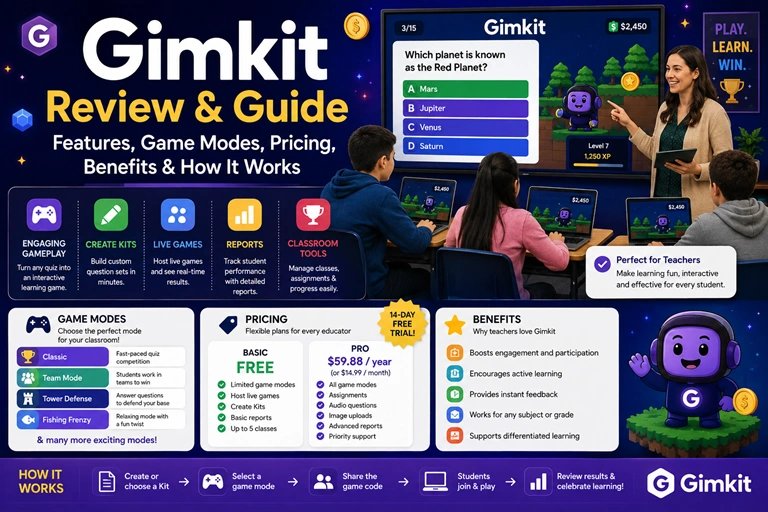
Gimkit is an educational platform that turns question-based practice into interactive gameplay. Teachers create Kits containing questions and answers, then select a game mode and host a session.
The basic process looks like this:
- Create or select a Kit.
- Choose Play Live.
- Select a game mode.
- Configure the available game options.
- Share the game code, QR code or join link with students.
- Students enter the game.
- Students answer questions and interact with the selected game mechanics.
- The teacher monitors the session and reviews results.
Gimkit’s official Help Center currently organizes its platform around Kits, Hosting, Game Modes, Gameplay, Classes, Assignments and Gimkit Pro, which gives a good indication of how the service is intended to be used.
The clever part is the separation between the learning content and the game format. A teacher can build a question set around vocabulary, mathematics, science or history and then use different game modes depending on the lesson.
That makes Gimkit more flexible than a simple multiple-choice quiz.
What Is a Gimkit Kit?
A Kit is the question set used in a Gimkit activity. Teachers can create their own Kits and organize questions around a particular topic or lesson.
For example, a biology teacher might create a Kit covering:
- Cell structure
- Cell functions
- Photosynthesis
- Cellular respiration
- Scientific vocabulary
The questions become the academic foundation while the selected game mode determines how students interact with them.
This approach also means teachers don’t necessarily have to start from zero every time. Gimkit provides tools for creating content and working with question sets, making it possible to build a reusable library for different classes and review sessions.
What Are the Main Gimkit Features?
Gimkit’s feature set goes beyond simply displaying questions and counting correct answers.
1. Interactive Game Modes
Game modes are arguably the feature that gives Gimkit its personality. The platform offers different modes designed around different classroom experiences. Gimkit describes its modes with labels that can help teachers identify whether a particular option is more calming, strategic, collaborative or exciting.
This matters because not every class needs the same type of activity.
A competitive mode may work well for an energetic exam-review session. A collaborative mode may make more sense when the teacher wants students working toward a shared objective.
2. 2D Game Modes
Some Gimkit modes use 2D environments where students control small characters called Gims. These modes can add movement, strategy and additional gameplay mechanics to the question-answering experience.
The result feels closer to a lightweight multiplayer game than a traditional classroom quiz.
There is also a progression system tied to these 2D modes. Gimkit says students can earn XP through 2D gameplay and use GimBucks to purchase items from its Item Shop.
3. Custom Game Options
Teachers aren’t simply locked into one fixed version of a game.
Gimkit provides standard and mode-specific game options. Depending on the selected mode, teachers can configure objectives such as time, cash, investigations, difficulty or question counts. Options can also include late joining and class connections.
For 2D modes, teachers can also adjust the balance between answering questions and gameplay rewards.
That’s a useful classroom control. If students are spending too much time on game mechanics and not enough time answering questions, the teacher can adjust the balance rather than abandoning the activity altogether.
4. Classes
Gimkit’s Classes feature is designed for teachers who use the platform repeatedly rather than for a single one-off game.
Classes can help teachers manage student names, track assignment progress, review multiple assignment completions and save assignment progress. Gimkit’s current documentation was updated in May 2026 and confirms these functions.
For a teacher using Gimkit every week, that organization can make a meaningful difference.
5. Assignments
Assignments extend Gimkit beyond live classroom sessions.
With an Assignment, students can complete a selected Kit and game mode independently. Gimkit currently lists Assignments as a Pro feature.
Teachers can set goals for assignments, including cash and optional question goals. The assignment is completed when the applicable target is reached.
That makes Assignments potentially useful for homework, independent practice and revision outside the classroom.
Which Gimkit Game Modes Are Best?
There isn’t one universally “best” Gimkit game mode. The better question is: What are you trying to accomplish with the activity?
Gimkit itself recommends using its Mode Picker to browse available options and examine the descriptions and labels for each mode.
For Fast Review
Choose a mode that keeps students moving through questions without requiring too much explanation.
This is useful at the end of a lesson when the teacher wants to quickly check whether students remember key concepts.
For Strategy
A more strategic mode can work when students need to make decisions based on their answers and available resources.
This can make a review session feel less repetitive, especially for older students.
For Collaboration
If the classroom culture is becoming too competitive, a collaborative mode may be a better choice.
Students can still practice the material while working toward a shared outcome rather than focusing entirely on individual rankings.
For Longer Sessions
2D modes can provide a deeper gameplay environment. Gimkit describes these modes as potentially more complex and strategic than traditional modes, while some are simply designed around activities such as fishing.
The important thing is not to select a complicated mode simply because it looks impressive. If explaining the rules takes longer than the learning activity itself, you’ve probably chosen the wrong format.
How Much Does Gimkit Cost?
One of the strongest aspects of Gimkit is that teachers can use a free version.
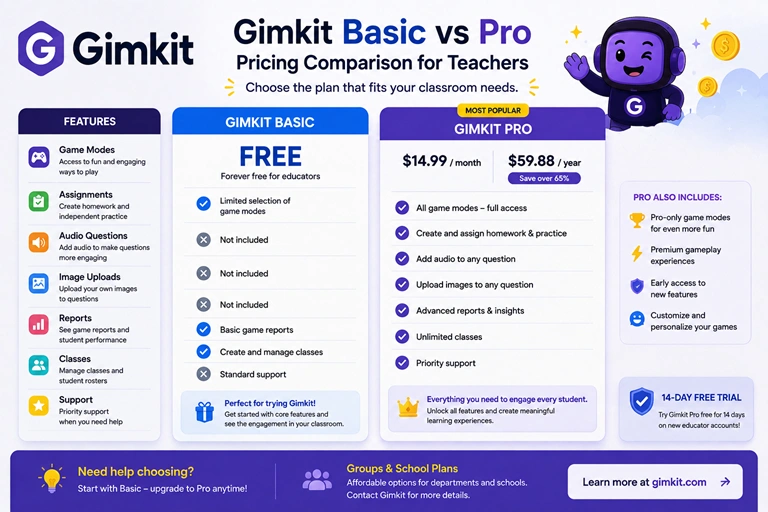
Gimkit currently offers Gimkit Basic, which is free. According to the platform’s current account documentation, educators can use the free version indefinitely. Basic users can host games, create Classes and collect game reports, while the number of available game modes is limited compared with Pro.
New educator accounts currently receive a 14-day Gimkit Pro trial before moving to Basic if they don’t continue with the paid plan.
Gimkit Pricing at a Glance
| Plan | Current pricing/features |
|---|---|
| Gimkit Basic | Free; core hosting, Classes and reports |
| Gimkit Pro Monthly | $14.99/month |
| Gimkit Pro Annual | $59.88/year according to current Pro FAQ |
| Gimkit Groups – Department | $650/year for up to 20 teachers |
| Gimkit Groups – School | $1,000/year for the school license |
Gimkit’s current Pro FAQ lists the monthly Pro price at $14.99 and annual Pro at $59.88. It also lists department and school group licenses at $650 and $1,000 per year respectively.
Because educational software pricing can change, teachers should verify the current price on Gimkit before purchasing.
What Does Gimkit Pro Add?
The main Pro advantages include:
- Access to Pro-exclusive game modes
- Assignments
- Audio questions
- Image uploads
- Unrestricted access to all game modes
Gimkit says Basic users generally have access to a rotating selection of featured modes, while Pro provides access to all modes.
For a teacher who only wants an occasional review game, Basic may be enough. For someone using Gimkit as a regular part of homework, revision and classroom practice, Pro becomes easier to justify.
What Are the Benefits of Gimkit?
It Makes Repetition More Engaging
Students often need repetition to master vocabulary, formulas and factual information. The problem is that repetitive worksheets can become monotonous.
Gimkit gives that repetition a game structure.
Students may answer the same type of academic question multiple times, but the surrounding gameplay provides another reason to stay engaged.
It Provides Immediate Feedback
Students generally don’t have to wait until the next day to discover whether they were correct.
That immediate feedback can make mistakes more visible while the material is still fresh.
For teachers, live gameplay can also reveal where students are struggling.
It Works Across Subjects
Gimkit isn’t limited to one subject.
A teacher can build Kits for:
- Mathematics
- Science
- History
- Geography
- Languages
- Vocabulary
- Exam preparation
- General knowledge
The platform’s value comes from the question content and the way that content is used.
It Can Support Different Classroom Styles
The availability of different game modes and customizable options gives teachers more control over the classroom experience.
A competitive class doesn’t have to use the same format as a quieter group. Teachers can also change the relationship between academic answers and gameplay rewards in supported 2D modes.
It Has Useful Teacher Management Tools
Classes and reports can make Gimkit more useful for teachers who want something beyond entertainment.
Gimkit’s documentation states that Basic users can create Classes and collect game reports without limitations, while Pro adds features such as Assignments and additional game modes.
Are There Any Downsides to Gimkit?
Gimkit isn’t perfect, and its biggest weakness can actually come from its biggest strength: the game mechanics can become distracting.
Some students will focus heavily on winning, rankings, virtual currency or power-ups rather than thinking carefully about the academic content.
There’s also a preparation issue. A teacher still needs to create or review quality questions. Turning a poorly designed quiz into a game doesn’t automatically make it educational.
Another consideration is the difference between Basic and Pro. The free plan is useful, but teachers who want the full collection of game modes and independent assignments may eventually need Pro.
Finally, game-based learning isn’t appropriate for every lesson. Sometimes students need direct instruction, discussion, writing practice or quiet problem-solving. Gimkit works best as one component of a broader teaching strategy.
How to Use Gimkit Effectively in the Classroom
The best approach is to start with the learning objective.
Don’t begin by asking, “Which game looks the most fun?”
Instead ask:
What should students know or be able to do when this activity ends?
Then build the Kit around that goal.
For example, if students are preparing for a math test, use a mixture of straightforward calculation questions and questions that require students to choose the correct method.
If you’re teaching vocabulary, don’t make every question a definition match. Include words in sentences and ask students to identify meaning from context.
A useful classroom sequence might look like this:
Teach → Practice → Gimkit Review → Discuss Mistakes → Reassess
That final discussion is important. A game can show that students are getting questions wrong, but the teacher still needs to explain why.
Is Gimkit Worth It?
For teachers who want a more interactive alternative to traditional quiz platforms, Gimkit is worth trying.
The free Basic version lowers the barrier to entry, while Pro adds meaningful features rather than simply removing advertisements or cosmetic restrictions. The current Pro offering includes additional game modes, Assignments, audio questions and image uploads.
The strongest use case is probably review and practice. Gimkit is particularly effective when students already have some familiarity with a topic and the teacher wants them to retrieve, apply and repeat information in an engaging environment.
For completely new concepts, however, it shouldn’t replace explanation and guided instruction.
Our verdict: 4.5/5 for classroom engagement, flexibility and game-based review.
The free plan is strong enough to test the platform, and Pro is most attractive for educators who want deeper game-mode access and independent assignments.
Gimkit vs Traditional Quiz Platforms
Gimkit’s biggest distinction is the emphasis on gameplay.
A conventional quiz platform generally focuses on questions, answers and results. Gimkit adds a layer of strategy, rewards, progression and game objectives.
That doesn’t automatically make Gimkit better. It makes it different.
If your priority is a simple assessment, a conventional quiz may be more appropriate. If your goal is to make repeated practice feel more interactive, Gimkit has a compelling advantage.
The choice should therefore depend on the lesson rather than the popularity of the platform.
Frequently Asked Questions
What is Gimkit mainly used for?
Gimkit is mainly used for interactive classroom review and practice. Teachers create Kits with questions, select game modes and host live sessions where students answer questions while participating in game-based activities.
Is Gimkit free?
Yes. Gimkit offers a free Basic plan for educators. The current Basic version supports core features such as hosting games, Classes and reports, while Pro adds additional game modes, Assignments, audio questions and image uploads.
How much is Gimkit Pro?
Gimkit’s current Pro FAQ lists Pro at $14.99 per month or $59.88 per year. Group options are also available for departments and schools. Prices can change, so check the official Gimkit information before purchasing.
Do students need a Gimkit account?
No. Gimkit’s current account documentation says student accounts are optional. Students can play live games and assignments without logging into Gimkit, although teachers using Classes may have students create accounts for roster and progress-management purposes.
Final Verdict
Gimkit succeeds because it understands something teachers already know: students are more likely to participate when the activity feels active rather than passive.
Its combination of Kits, game modes, customizable options, Classes, reports and Pro features gives educators plenty of flexibility. The free Basic plan is particularly appealing for teachers who want to experiment before paying for additional functionality.
The catch is that Gimkit should support the lesson, not become the lesson. A clever game cannot compensate for weak questions or unclear learning goals.
Used at the right moment, though, Gimkit can turn an ordinary review session into something students actually want to participate in—and that’s a useful advantage for any classroom.